|
The answers to most questions can be found in the extensive Help file in Freshmap.
Freshmap works on Windows Windows 7, 8, 10, 11.
Freshmap does not work on earlier versions of Windows.
Freshmap works on MAC High Sierra, Mojave, Catalina, Big Sur, Monterey, Ventura, Sonoma
Freshmap does not work on earlier versions of MAC OS.
Freshmap Topographic Mapping
Which Garmin GPS does Freshmap work with?
Please click on this link to see a list of these GPS.
Freshmap with Garmin GPS
My computer doesn't have a DVD drive. Can I still have Freshmap on it?
Absolutely. Just ask for it to be supplied to you on a memory stick. You will also be given instructions as to how to load it.
How is the elevation data in the TaskBar obtained? It doesn't seem to match the elevation numbers that appear on the maps.
Elevation data for the task bar and 3D rendering is calculated from a rectangular grid of altitudes across NZ. The grid is generated from a weighted average using contour data. The net effect of all this averaging is that the calculated average at any given cursor position can differ from the depicted contour line height especially on flatter terrain. The calculation is not able to use data directly from the map. As well as this the underlying contours are only accurate to about 20m or even less accurate in forested areas.
Will Freshmap work with the Edge 705/800?
The Edge 705 works well with Freshmap. If your Edge 705 isn't working as well as you expected, check the GPS port setting in Freshmap Options. The setting it should either be set to AUTO or MASS to work with the Edge.
The device itself has some limitations - you can transfer waypoints to and from the device and tracks TO the device, but not tracks FROM the device except via the training software. Load your training logs into the training software and export them as gpx files. These files can be imported into Freshmap using User Feature/Import. Also all these bulk devices seem to receive tracks with a 'hide on map' status by default so you need to manually go into each track on the device after uploading and set it to show.
Can I use Freshmap with a Garmin Nuvi / Drive GPS?
You can use Freshmap for waypoint and routes - both uploading and downloading - but not for tracks.
How do I replace the GPS protocol file on Freshmap for Mac
Download the GPSProtocols.xml file to a suitable location.
Open /Applications with Finder on your main hard drive and find Freshmap.app
Right click on this and choose 'Show package contents'
Open the 'Contents' folder if it is not already open.
Drag the GPSProtocols file onto the 'Resources' folder and agree to overwriting the old version of GPSProtocols.xml
How do I replace the GPS protocol file on Freshmap for Windows
Download the GPSProtocols.xml file to a suitable location - the Desktop works best
Using Explore, go to c:\Program Files\Freshmap
Drag the GPSProtocols file into this and agree to overwriting the old version of GPSProtocols.xml
I would like to get a better quality screen image from Freshmap than the screen dump allows. How can I do this?
You will need to buy a 'Print to bitmap' program of some sort. There are many of these. For example this one http://www.zan1011.com/download.htm looks ok and doesn't cost too much and you can try it out before buying. These programs install theselves as virtual printers and you can set up the dpi for the quality and page size you want and then set them as the map printer in Freshmap. This means you can export ('print') selected areas from Freshmap in a much better quality than the 96dpi of a screen and then use or edit them as you would any other image
I want to add x,y data to show locations. Is there a way to enter this information into a separate spreadsheet then import it into Freshmap?
The only way to import data is via GPX /XML files. There are numerous utilities on the internet that will convert csv files to GPX - just Google csv gpx utility. These will only work with WGS84 coordinates.
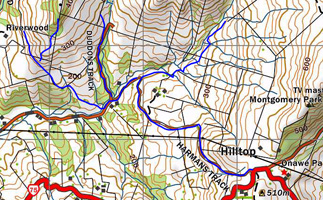
Can I see the Paper Roads on Freshmap?
From 2017, Freshmap has been supplied with not only the topograpic maps of New Zealand but also the cadastral maps (property boundaries).
The cadastral maps will enable you to not only view "paper roads", but to also print them off.
(See image. The blue line has been drawn on Freshmap Cadastral 1:50,000, and then the screen shot was taken from Freshmap Topo and Streets to show the location of the paper road. This location is near Hilltop on Banks Peninsula.)
Is it possible to print off the Legend?
It is possible to print the Legend file. In either Windows or Mac, just go to File, Print Legend.
Can I use GPX files with Freshmap?
YES. All user feature attributes are exported from Freshmap using the gpx format, but gpx files imported from other sources may not contain all details.
Can Freshmap do on-screen area calculation?
Draw a track on Freshmap (right click, New, Track/Route). Once you've drawn the line around the area to be calculated, point to the Track, right click and go to Properties. In the status bar at the bottom of the dialog box, you will see not only the distance covered, but the area calculated in hectares.
How can I delete a series of waypoints in Freshmap Topo?
Use the following list of instructions:
Click on User features on the Freshmap toolbar
Select Manage
Make sure all boxes are empty
Click on OK
Highlight the features to be deleted
Right click and select Delete
There is more information about these sorts of things in the Help file under User Features Properties.
How much space does Freshmap take on my hard drive?
* New Zealand Topo and Streets 4.2gb
* New Zealand Cadastrals 700mb
* New Zealand Aerials 2.8gb
Can I import waypoints from other programs?
Freshmap is designed to accept waypoints in .xml format. Waypoints from TopoMapPro are also recognized. If you want to use waypoints that are in other formats, try the following link:
www.gpsbabel.org
How do I set Garmin symbols on the waypoints?
When you are creating a waypoint on Freshmap Topo and Streets (right click, New, Point feature) you are able to choose which Garmin icon you want to allocate to that waypoint. This will not appear on the screen. The icons are downloaded to your GPS and visible there.
Does Freshmap Topo and Streets have road mapping too?
Freshmap's road maps cover the urban or built-up areas. Once the map gets out into the country area, you need to switch to the 1:50,000 scale maps to get the roads.
Where can I find declination information?
Go to this link: Declination information
Freshmap for Garmin GPS
Why are some features visible on Freshmap Topo and Streets, but not visible on the maps on the GPS? Mt Herbert and Packhorse Hut, for example, are missing from the GPS mapping.
These features definitely are present in the Freshmap GPS maps. GPS maps are 'object oriented' maps. In this context that means that vector objects are supplied together with description data to the GPS, but the actual display format is largely under the control of the GPS firmware itself. In particular the firmware has a mind of its own regarding the display of object names. This is influenced by the text size you have chosen, the length of the object name, the current zoom of the GPS and the presence of other nearby features that the firmware deems more important to name.
Is Freshmap on my GPS a substitute for taking a topomap with me outdoors?
A topomap covers approximately 1350 square kilometres. You simply can't view this amount of map on a GPS screen, so just as you should always take a compass with you, so you should always have a topomap too.
What do I do if Freshmap for Garmin GPS is no longer visible on my GPS?
Remove the card from the GPS, and put in back in. This is the quickest method to "reintroduce" the mapping and the GPS. Once you put the card back into the GPS, it should recognise the existence of the mapping straight away.
Is it possible to download maps from Freshmap onto my Garmin GPS?
In order to have Freshmap mapping on your GPS, you need a GPS that is able to take a microSD card (GPS with "x" at the end of the name), and you need Freshmap for Garmin GPS which is only available on microSD card.
Is it possible to overwrite Freshmap on the data card?
Yes it is. If you want to save other maps or information onto the card, it's a good idea to make a separate folder on the microSD card to save that data into.
Is it possible to save tracks to the Freshmap microSD?
To save tracks to the microSD card of a GPS, follow these instructions:
Tracks
Enter
Setup
Enter
Data card setup
Tick Log track to datacard box
|